
G Pen · ACCESSORIES · DEFAULT
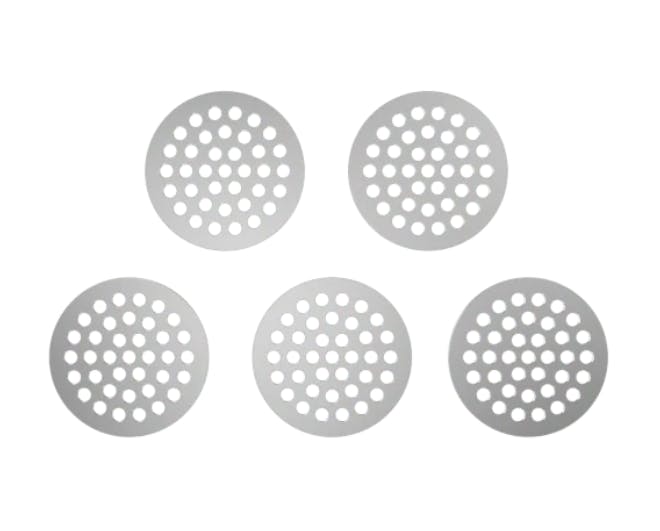
G Pen Dash Mouthpiece Filter Screens, 5-Pack
$6after tax · NY tax computed on pre-discount price
In stock · 6 available
About this product
The G Pen Dash Mouthpiece Filter Screens 5-Pack delivers five replacement screens designed specifically for the G Pen Dash vaporizer, keeping airflow clean and vapor quality consistent session after session. Available at ZenZest's Queens-Long Island and Staten Island locations, or via same-day delivery to 80-plus New York ZIP codes, these small components make a meaningful difference in the long-term performance of your device.
What it is
The G Pen Dash Mouthpiece Filter Screens are precision-cut replacement screens engineered to fit the mouthpiece assembly of the G Pen Dash dry-herb vaporizer. Their primary function is to act as a barrier between the herb chamber and the mouthpiece, catching fine particulate matter that would otherwise travel through the airpath and into the draw. Over repeated sessions, screens accumulate residue that restricts airflow, diminishes vapor quality, and can introduce off-flavors. Swapping in a fresh screen restores the clean, unobstructed draw the Dash was designed to deliver. Installation requires no tools — screens seat directly into the mouthpiece — making maintenance quick and straightforward.
Why this matters at ZenZest
Purchasing accessories through a New York OCM-licensed adult-use retailer like ZenZest means you are buying authentic, brand-verified components rather than generic aftermarket parts of uncertain origin or fit. Counterfeit or improperly sized screens can compromise your vaporizer's performance and, in some cases, introduce materials not intended for heated airpaths. ZenZest sources directly from authorized brand channels, so the G Pen Dash screens you receive are manufactured to the tolerances the device requires. With same-day delivery available across 80-plus NY ZIP codes and in-store pickup at Queens-Long Island and Staten Island, keeping your device properly maintained has never been more convenient.
Pairings
Clean screens pair naturally with freshly restocked dry herb — there is little point in loading quality flower through a clogged airpath. Consider picking up a G Pen Dash cleaning kit or isopropyl alcohol wipes at the same time to complete a full maintenance cycle. For the session itself, a screen refresh pairs well with a lower-temperature setting on the Dash, a relaxed listening environment — jazz, ambient, or acoustic works particularly well — and a light, flavor-forward snack that lets the terpene profile of your chosen herb remain the focal point.
If it's your first time
If you are new to dry-herb vaporizers, screen maintenance is one of the most overlooked aspects of device ownership. A fresh screen is installed at the base of the mouthpiece before you draw; it requires no special technique. Replace screens when you notice reduced airflow or a change in taste — for regular users that may be every few sessions. New to vapor in general? Start with short, gentle draws and a lower temperature setting, and give yourself a moment between draws to gauge the effect.
Frequently asked
Are these screens compatible with G Pen Dash vaporizers only, or do they fit other G Pen models?+
These screens are designed specifically for the G Pen Dash mouthpiece assembly. G Pen produces several vaporizer models, each with its own dimensional tolerances, so screens are not universally interchangeable across the lineup. If you own a different G Pen device, verify compatibility with the product listing or ask a ZenZest associate before purchasing.
How often should I replace my G Pen Dash mouthpiece screen?+
Replacement frequency depends on how often you use your device and how thoroughly you clean it between sessions. As a general guideline, if you notice restricted airflow, a harsher draw, or off-flavors that persist even after cleaning, it is time for a new screen. Regular users typically find that replacing the screen every few weeks keeps performance consistent.
Can I clean and reuse a G Pen Dash screen rather than replacing it?+
Light residue can sometimes be removed with a dry brush or a brief soak in isopropyl alcohol, followed by thorough drying before reinstallation. However, screens are fine mesh components that degrade over time. Once a screen is visibly warped, torn, or no longer seats properly in the mouthpiece, replacement is the safer and more effective option.
Is same-day delivery available for accessories like these at ZenZest?+
Yes. ZenZest offers same-day delivery to more than 80 New York ZIP codes, including accessory orders. If you need screens quickly to get your device back in working order, placing an order through the ZenZest website or calling ahead to confirm your ZIP code's eligibility is the fastest path to getting them in hand.
Do I need any tools to install a replacement screen in the G Pen Dash mouthpiece?+
No tools are required. The G Pen Dash is designed with accessible maintenance in mind. The replacement screen seats directly into the mouthpiece assembly by hand. Refer to the G Pen Dash user guide for the precise orientation if you are unsure, and a ZenZest associate is also available in-store to walk you through the process.